Start dates: out of sight until it matters
Give a task a start date and it leaves your lists until then. On the day, it turns up in Today. Until then, the only place you'll see it is Upcoming.
Type it the way you'd say it
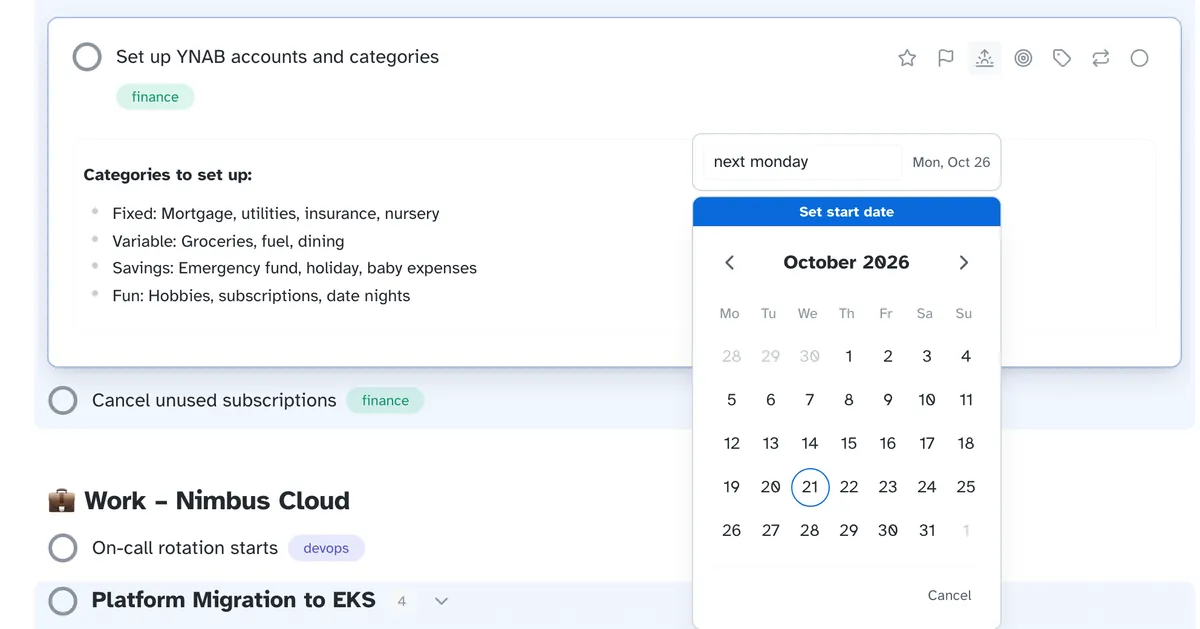
Open a task, pick the start date and type next monday. The renewal you
can't do until March, the follow-up that's pointless before Friday: set them once and
stop scrolling past them.
Start and due are separate
A start date says when you can begin. A due date says when it has to be done.
Today fills itself
Tasks that start today arrive in Today without you moving them.
Nothing lost while it waits
Upcoming lists everything with a start date ahead.
Bring them with you
Copy a task from Things 3 and paste it in: it keeps its start date.
Which apps hide a task until its start date?
| App | Start dates that hide a task |
|---|---|
| Irkless | Yes |
| Things 3 | Yes |
| OmniFocus | Yes, defer dates |
| Nirvana | Yes |
| Toodledo | A start date field |
| Asana | A start date that doesn't hide the task |
| Apple Reminders | No, a date or location alert |
Checked against each app's own website in October 2026. Features change, so check before you decide.
Start dates do the job of the tickler file in Getting Things Done, without the folders. See how Irkless fits the method, or everything else it does.
Try it on a real week
Thirty days, every feature, no card. Put this week's tasks in it and see whether you trust it by Friday.